The application-data problem

Application data is the problem. Messy resumes, native ATS autofill, and manual re-entry drop fields, mix them up, or leave them blank. The application is inaccurate before anyone reviews the person.

You don’t need another ATS — you need more accurate application data.

ApplyOptics reads the resume and transcribes it into application fields. You confirm anything uncertain. The hiring team gets human-confirmed application data and keeps the ATS it already uses.

We transcribe, not score!

This page runs a live vision extract. Submit stays on this page. Nothing is posted to an ATS.

Prepared walkthrough

This is a fictional Jordan_Ellis_Resume.pdf sample with fields already filled. It is not a live extraction. Upload a file to run the public demo. Confirm the highlighted field, then submit to see a simulated transcript.

✅ Filled from Jordan_Ellis_Resume.pdf — including civilian resume and clearance capture. Check the count list against the resume. A missing row is the one thing we cannot flag.

Count check

2 jobs transcribed

  1. Northline Manufacturing — Operations Manager
  2. Northline Manufacturing — Operations Supervisor

1 school transcribed: Lakeshore State University — B.S.

1 cert transcribed: Lean Six Sigma Green Belt

9 of 9 key fields filled

Key fields are first name, last name, email, phone, job title, and the employer and title on each transcribed job. A blank stays blank. This does not guess how many jobs the resume has.

Shadow test (optional)

Confirmed without an edit: 0. Confirmed after an edit: 0. A download includes corrected values from this session only. It is not added to the public lock pack, and it is not an accuracy score.

1 field needs your confirmation

  • Credential 1 NameLean Six Sigma Green Belt
Contact
Military background → civilian title

Civilian resume — no occupation-code translation needed.

Clearance
Work history

Role 1

Role 2

Education

School 1

Certifications

Credential 1

⚠ Low confidence (61%) — certification name uncertain. Edit to correct, then confirm.

How it works

We transcribe, not score!

Upload. Transcribe. The candidate confirms uncertain fields. Then a clean record for the employer ATS. We do not score or rank.

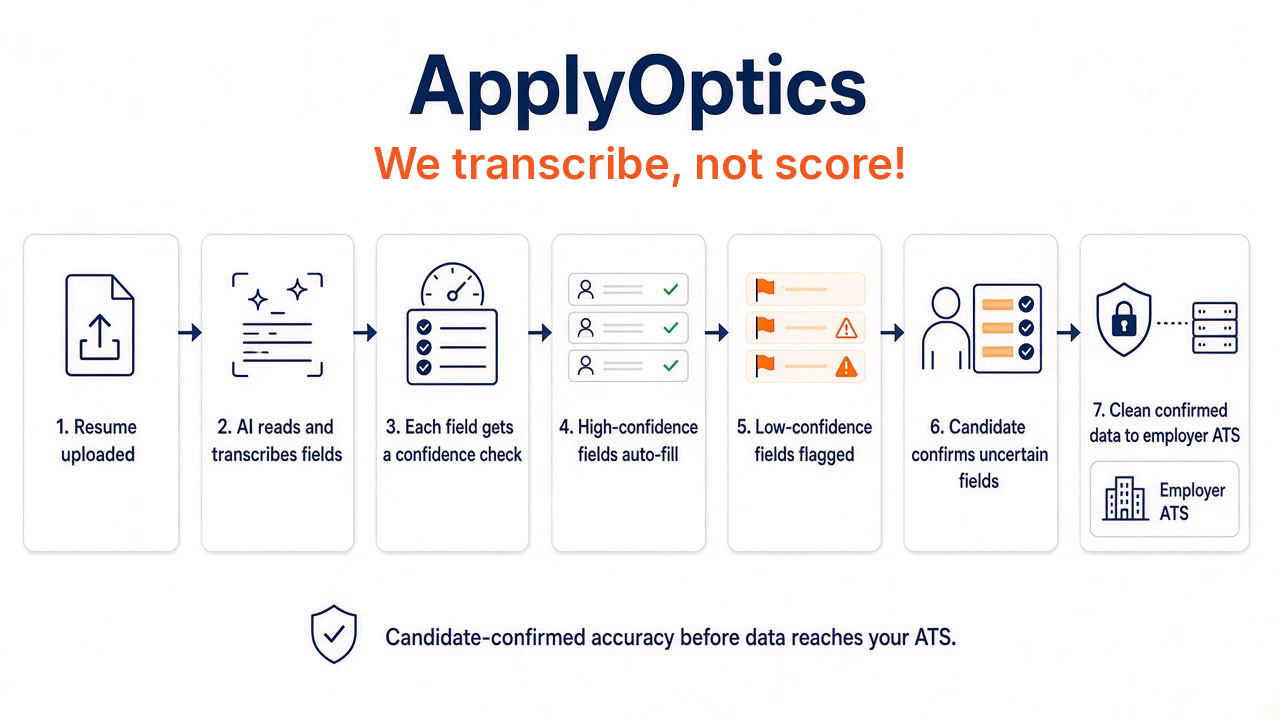
Seven-step ApplyOptics workflow: resume uploaded, AI reads and transcribes fields, each field gets a confidence check, high-confidence fields autofill, low-confidence fields are flagged, the candidate confirms uncertain fields, and clean confirmed data goes to the employer ATS. We transcribe, not score! We do not score or rank.
  1. 1.Resume uploaded
  2. 2.AI reads and transcribes fields
  3. 3.Each field gets a confidence check
  4. 4.High-confidence fields autofill
  5. 5.Low-confidence fields are flagged
  6. 6.Candidate confirms uncertain fields
  7. 7.Clean confirmed data to the employer ATS